Designing for Industrial AI
Rule Engine & Asset Permissions
Industrial AI Platform | 3 months | UX design

About the Company
I worked as a Product Designer at a global enterprise AI company, specifically within the industrial software division. This team delivers AI-powered platforms to large-scale manufacturing, energy, and process companies, enabling smarter operations through automation, rule-based governance, and real-time analytics.
This platform helps:
-
Connect OT, IT, and edge data into one trusted system
-
Automate industrial decision-making using rule engines
-
Control asset access through robust permission models
-
Enable AI-driven workflows across control rooms, plant floors, and frontline workers

Rule Engine Project
Objective: To create a visual rule-building experience that allowed engineers and operators to manage conditions, triggers, and actions efficiently.
This project involved designing a clear, user-friendly interface that let non-technical users (like operators and managers) set up automated rules without needing developer help. These rules triggered real-time alerts based on specific system events or anomalies, helping teams spot issues early, minimize downtime, and keep operations running safely.
Discovery
Activities:
-
Reviewed existing documentation rule-building tools
-
Collaborated with PMs to map legacy logic
-
Audited existing UI patterns in adjacent enterprise software
-
Participated in early technical architecture planning
This stage is ideal for brainstorming and sketching initial ideas while reviewing the PRD. It helps define key features, map out user flows, and build a clear structure to guide the design process.


UX Approach
Objective: Make rule-building intuitive and safe for users without programming knowledge, while allowing complex conditional logic.
Design work:
-
Developed user flows for rule creation, editing, testing, and auditing
-
Created a modular design system for triggers, conditions, and actions
-
Introduced visual logic builder with nested condition blocks
-
Included inline validations, tooltips, and traceability tools
Rule creation
Define rule conditions
In this step, users define the triggering conditions for the rule — the specific data inputs or system events that will cause the rule to activate. The design allows users to select data points (e.g., sensor readings, asset status), apply logical operators (e.g., greater than, equals), and combine conditions using AND/OR logic.


Configure Alert Settings
In this step, users fine-tune how and when the system should trigger alerts once rule conditions are met. The goal is to ensure alerts are accurate, timely, and meaningful — especially in high-stakes industrial environments where false alarms or missed warnings can have serious consequences.


Alert rules
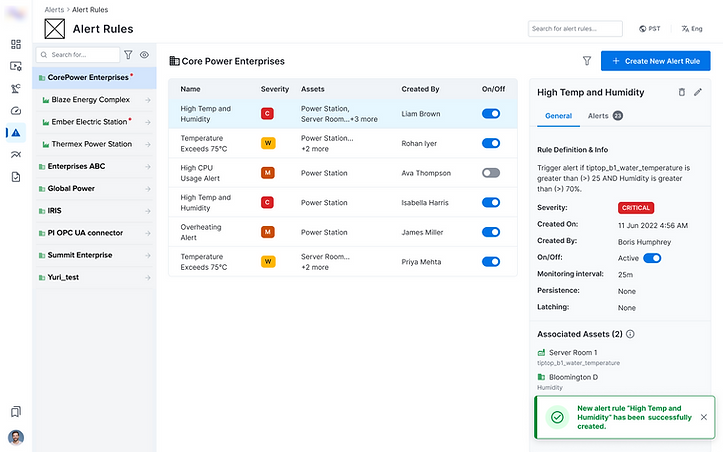
A centralized page where users can monitor, edit, and manage all alert rules. Includes real-time status indicators, quick actions (edit, disable, clone), filtering, and access to audit logs.
.png)
Project outcome
Designing the Rule Engine interface was a deep dive into simplifying complexity for industrial users. From my perspective, this was a challenging yet deeply rewarding project that pushed me to apply analytical thinking, systems design, and UX clarity in equal measure. It required understanding complex logic and translating it into intuitive, safe, and scalable interactions. The result was a user-centered solution that improved efficiency, reduced errors, and increased trust across operational teams.
-
Reduced onboarding/setup time for new users
-
Decreased security incidents caused by permission gaps
-
Empowered admins to manage access at scale with greater confidence

Asset-Level Permissions Project
Objective: To create a system that enables plant administrators to manage access to assets in a flexible, secure, and efficient way.
This project focused on designing an intuitive interface for managing asset-level permissions. The goal was to help administrators precisely control who can view, edit, or manage specific assets (such as plants, production lines, or machines).
Add new users
In this step, administrators add a new user and assign initial access to specific assets. This provides a quick way to grant the right level of access when onboarding users, while more advanced permission settings are handled at the asset level.


View asset permissions
In this step, administrators review existing asset-level permissions. The interface provides clear visibility into who has access to which assets and data, using filters and permission states to quickly assess and verify current configurations.

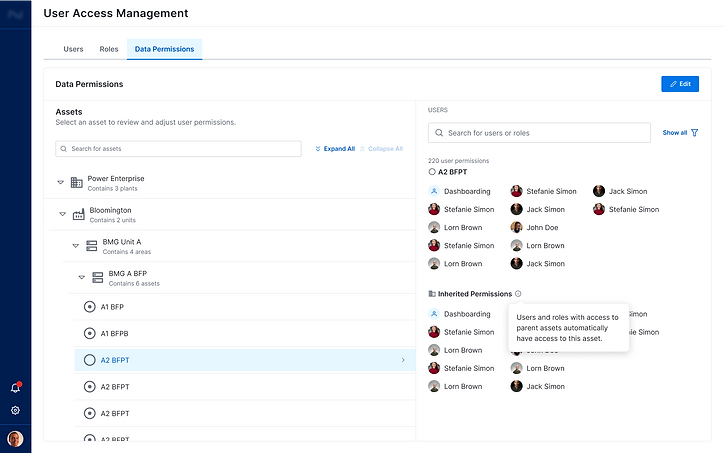
Edit asset permissions
In this step, administrators update asset-level access while maintaining flexibility, visibility, and clarity.
.png)
.png)
Project outcome
Designing the Asset-Level Permissions system required translating complex access logic into a clear and scalable experience for industrial users. From my perspective, this was an analytical project that challenged me to balance flexibility, safety, and usability. The result was an intuitive, system-driven solution that improved clarity, reduced risk, and supported confident access management at scale.
-
Reduced onboarding/setup time for new users
-
Improved visibility into asset-level access and permission states
-
Enabled administrators to manage access more easily and efficiently, while maintaining a high level of flexibility and customization.
.png)